Getting started with Semantic Hub
Semantic Hub gives business-friendly names and reusable calculations to data that lives in database tables or queries. Authors describe the data once in YAML; Semantic Hub validates those definitions, plans safe joins and aggregations, and generates SQL for a supported target.
This guide introduces the main ideas with a small path through TPC-H, a sample order-management schema. It favors the shortest useful examples over complete property coverage. The semantic catalog is checked in under QueryCompiler/examples/tpch/shl; TPCH query and database fixtures remain under ../SemanticHubSQL/examples/tpch.
By the end, you will know how to:
- connect a catalog to a database;
- map tables to datasets and declare their grain;
- expose source values as semantic fields;
- connect datasets with joins;
- define a reusable revenue metric;
- choose the datasets available in a semantic model; and
- ask for revenue by region without writing a physical SQL join.
The TPC-H relational source
TPC-H is an order-management schema with eight physical tables. Customers place orders made up of line items; parts are supplied by suppliers; customers and suppliers belong to nations; and nations belong to regions. The diagram below shows the database structure before Semantic Hub adds semantic names, governed calculations, or query-planning rules.
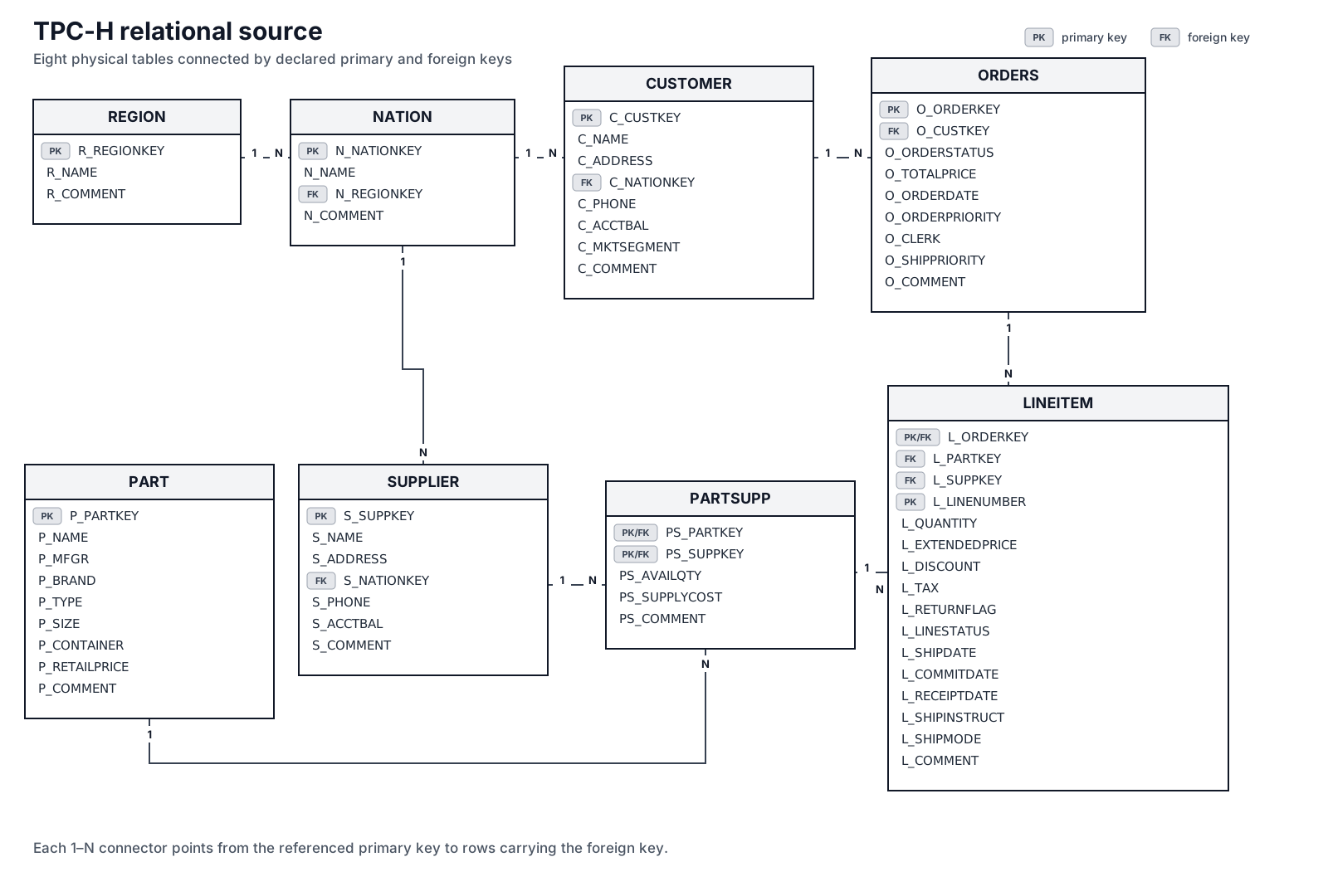
Open the source ER diagram at full size.
The boxes list physical database columns. PK marks a primary-key component, FK marks a foreign key, and each connector runs from one referenced row to many referencing rows. Two grains are composite: one PARTSUPP row is identified by part plus supplier, and one LINEITEM row is identified by order plus line number. LINEITEM also carries the part-and-supplier pair needed to reach PARTSUPP.
This full diagram is useful source context, but a semantic model does not need to flatten all eight tables into one wide object. It preserves their separate grains and uses only the relationship paths required by each query.
The finished model
This introduction follows the five-dataset path needed to calculate line-item revenue by customer geography. The diagram switches from physical table columns to Semantic Hub concepts: dataset grain, representative authored fields, and the governed revenue and order_count metrics.
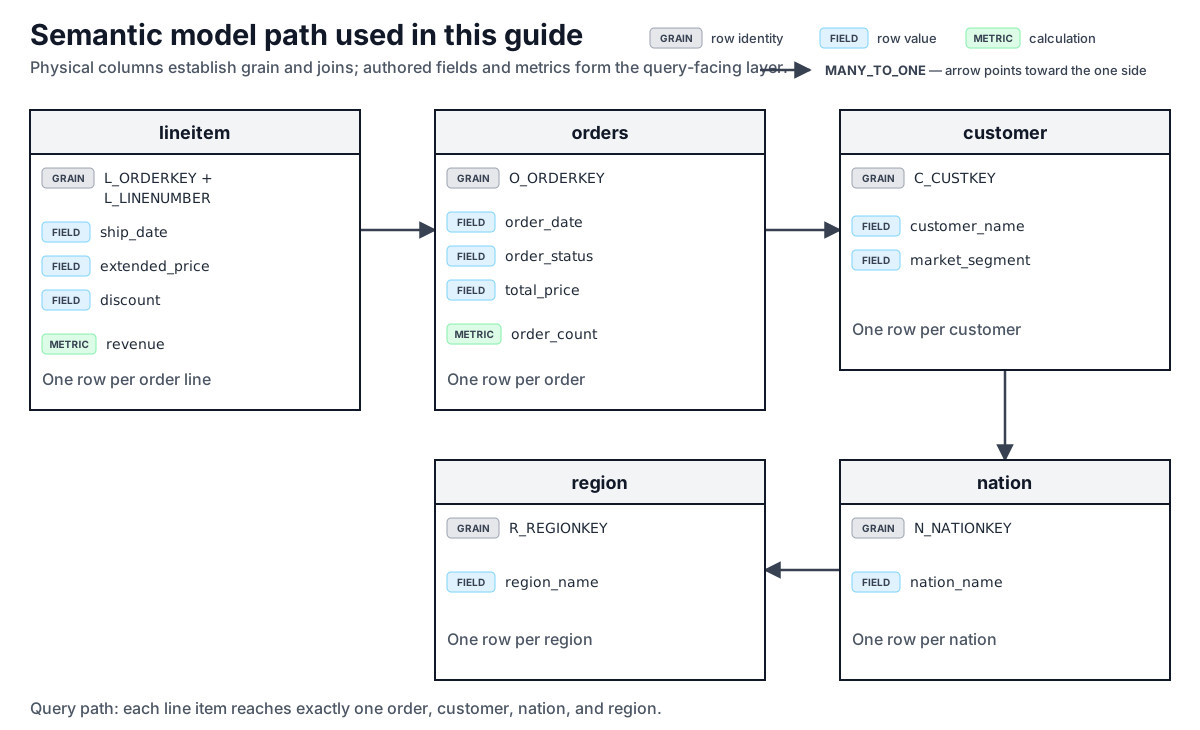
Open the semantic-model diagram at full size.
Every arrow is MANY_TO_ONE in the direction used by the query path. Consequently, each line item reaches at most one order, customer, nation, and region. That scalar property lets region_name group line-item revenue without multiplying source rows. The complete repository example also models part, supplier, and the partsupp association dataset; we return to that broader graph after the beginner path is clear.
The concepts in one minute
| Concept | What it does | TPC-H example |
|---|---|---|
| Catalog | Groups the authored objects and selects a default connection. | tpch |
| Connection | Describes where and how data is accessed. | duckdb_tpch |
| Dataset | Gives semantic structure to one table or query result. | lineitem |
| Grain | States what uniquely identifies one dataset row. | Order key plus line number |
| Field | Gives a typed semantic name to a row-level value. | ship_date |
| Join | Declares an explicit, directional relationship between datasets. | orders to customer |
| Metric | Defines a reusable calculation with controlled aggregation semantics. | revenue |
| Semantic model | Selects roots and therefore the connected data graph available to queries. | orders_analytics_duckdb |
| Query | Selects semantic fields and metrics; the compiler plans target SQL. | Revenue grouped by region |
The most important concept is grain. Before defining a metric or relationship, be able to finish this sentence: “One row in this dataset represents one …”. For orders, one row is one order. For lineitem, one row is one line within one order.
1. Start a catalog
A catalog uses a conventional directory layout:
catalog.yaml
connections/
datasets/
models/
The root manifest names the catalog and selects the default connection. The loader discovers the objects in the three subdirectories.
name: tpch
definition: TPC-H order analytics semantic catalog.
default_connection: duckdb_tpch
For the checked-in DuckDB fixture, the connection is:
name: duckdb_tpch
database_type: DUCKDB
database: tpch.duckdb
schema: main
Snowflake and PostgreSQL variants live beside it in the complete example. A semantic definition remains portable; a model selects the connection used for compilation or deployment.
2. Map a table to a dataset
Begin with the small REGION table:
name: region
table: REGION
unique_keys:
  - columns: [R_REGIONKEY]
fields:
  - name: region_key
    data_type: INTEGER
    expression: R_REGIONKEY
  - name: region_name
    data_type: TEXT
    expression: R_NAME
This definition establishes three things:
tableidentifies the physical source object.unique_keyssays thatR_REGIONKEYuniquely identifies a region row. Because there is one key, it becomes the dataset's atomic grain.fieldsexpose typed semantic values. Consumers useregion_name; the compiler binds its expression to the verified source columnR_NAME.
Physical source columns remain important for keys, joins, and expressions, but query-facing structural references select authored fields. This separation allows a source column to be renamed or replaced without changing every consumer-facing concept.
3. Connect datasets with joins
Each nation belongs to one region. The nation dataset declares that directional relationship:
name: nation
table: NATION
unique_keys:
  - columns: [N_NATIONKEY]
joins:
  - name: region
    join_type: MANY_TO_ONE
    from_columns: [N_REGIONKEY]
    to: { dataset: region }
fields:
  - name: nation_name
    data_type: TEXT
    expression: N_NAME
from_columns contains the foreign-key column on nation. The target omits key, so Semantic Hub uses the resolved grain key of region. The complete TPC-H example omits name and join_type where their documented defaults produce the same relationship; they are shown explicitly here for clarity.
Joins are path components, not suggestions to search the graph. From a nation, region.region_name means “follow the authored join named region, then select the authored field region_name.” Semantic Hub does not guess a shortest path.
The same pattern connects the rest of our path:
customerjoins many-to-one tonationthroughC_NATIONKEY;ordersjoins many-to-one tocustomerthroughO_CUSTKEY; andlineitemjoins many-to-one toordersthroughL_ORDERKEY.
Declaring cardinality is a correctness contract. A many-to-one path contributes at most one related value per source row, so it can safely provide grouping fields and row-level filter values. One-to-many paths can multiply rows and require fanout-aware planning; do not label them many-to-one merely to make validation pass.
4. Add fields and a metric
lineitem has a composite grain: one line number within one order. It also owns the reusable revenue calculation:
name: lineitem
table: LINEITEM
unique_keys:
  - columns: [L_ORDERKEY, L_LINENUMBER]
joins:
  - name: orders
    join_type: MANY_TO_ONE
    from_columns: [L_ORDERKEY]
    to: { dataset: orders }
fields:
  - name: ship_date
    data_type: DATE
    expression: L_SHIPDATE
  - name: extended_price
    data_type: DECIMAL
    expression: L_EXTENDEDPRICE
  - name: discount
    data_type: DECIMAL
    expression: L_DISCOUNT
metrics:
  - name: revenue
    definition: Extended price net of discount.
    metric_type: AGGREGATE
    aggregation: SUM
    expression: L_EXTENDEDPRICE * (1 - L_DISCOUNT)
A field is a row-level value. The revenue metric instead says how values become an aggregate result:
- calculate net revenue for each line item;
- sum those values at the grouping grain requested by a query.
metric_type: AGGREGATE identifies the metric family. aggregation: SUM identifies the aggregation function. Keeping the operation in the metric definition means every query uses the same governed revenue calculation.
5. Define the semantic model
A semantic model selects one or more root datasets. Every dataset reachable through an included authored join path enters model scope.
name: orders_analytics_duckdb
definition: Orders, revenue, and geography analytics.
connection: duckdb_tpch
root_datasets:
  - dataset: lineitem
Starting from lineitem, the compiler can reach orders, customer, nation, and region along the joins defined above. A root does not flatten those datasets into one permanent wide table. The query planner chooses the necessary paths and protects metric grains for each query.
The complete example adds optional deployment settings and the remaining TPC-H datasets. Those settings are not required to understand or validate the semantic graph.
6. Ask a semantic query
Now ask for revenue by region:
select:
  - orders.customer.nation.region.region_name
  - lineitem.revenue
from: orders_analytics_duckdb
order_by:
  - field: orders.customer.nation.region.region_name
    direction: asc
The selected field determines the output grouping. The metric remains anchored at the lineitem grain. Semantic Hub binds the complete relationship path, plans the required joins, aggregates revenue by region, and renders target-specific SQL.
Against the repository's deterministic fixture, the result is:
| region_name | revenue |
|---|---|
| AFRICA | 50.00 |
| AMERICA | 389.00 |
The query contains no physical table name, join condition, GROUP BY, or SUM. Those details come from the governed model.
7. Add a query filter
where filters the rows used by one query. For example, TPC-H order status F means fulfilled:
select: [lineitem.revenue]
from: orders_analytics_duckdb
where: "orders.order_status = 'F'"
The filter follows the scalar lineitem to orders relationship and binds the authored order_status field. Against the deterministic fixture, fulfilled revenue is 279.00.
A dataset's own filter has a different lifetime: it permanently defines which source rows belong to that dataset. A metric filter narrows only that metric's input population. Keeping these scopes separate prevents one metric's business rule from accidentally filtering its siblings.
What Semantic Hub validates
Semantic Hub does more than substitute names into SQL. Its compiler separates four responsibilities:
- Parse authored expressions and queries.
- Bind names and paths to verified columns and authored object identity.
- Plan joins, grains, filters, and metric evaluation independently of SQL syntax.
- Render identifiers, literals, and supported operations through the selected target dialect.
Normal authoring errors produce structured diagnostics. Examples include an unknown field, a join whose key shapes do not match, a non-Boolean filter, an aggregate used at row phase, or a relationship path that would cause unsafe fanout.
Common beginner mistakes
| Mistake | Better rule |
|---|---|
| Treating a dataset as “just a table name” | Declare its unique key and understand its atomic grain first. |
| Using physical columns in structural query selections | Expose an authored field and select that field. |
| Qualifying an expression path with dataset names | Resolve the path relative to the dataset where the expression is defined, and use explicit authored join names for every relationship step. |
| Assuming every relationship is many-to-one | Declare and validate the real directional cardinality. |
| Writing a row filter through a one-to-many path | Model an explicit fanout-safe calculation; ordinary row filters require scalar paths. |
Repeating SUM(price * ...) in every query |
Define one governed aggregate metric. |
| Writing database-specific SQL in a portable expression | Use the GENERIC expression language and let the target dialect render SQL. |
Explore the complete example
The checked-in QueryCompiler/examples/tpch/shl semantic catalog expands this introduction with:
- DuckDB, PostgreSQL, and Snowflake connection variants;
- all eight TPC-H datasets;
- composite keys and association-dataset relationships;
- aggregate and cumulative metrics;
- one-to-many fanout-isolation tests; and
- deterministic semantic-query test cases and expected rows.
When you are comfortable with this walkthrough, continue with:
- Modeling concepts for terminology;
- JSON Schema reference for property constraints; and
- Support and limitations for target considerations.
For detailed authoring guidance, continue with YAML model format, Object naming, and Expression language.